
Odoo
Unify your CRM, e-commerce, and inventory workflows. Connect directly with Odoo’s delivery order module via a joint setup to seamlessly read product weights and destinations, evaluate optimal courier service levels, and write back tracking and cost details to your ERP.
Feature / Data Point
Connection Details
Connection Type
Joint setup
Platform Type
ERP / Enterprise Business Apps
Module Connection
Connects directly with Odoo’s delivery order module.
Tracking Output
Writes back tracking and cost details automatically.
Transform How You Manage Your Modular Business Apps
Stop letting disconnected shipping tools bottleneck your open-source suite of enterprise business apps. The 2Ship joint setup gives organizations the automated tools they need to connect CRM, billing, manufacturing, and warehouse tracking directly to an advanced dispatch engine, bridging the gap between digital planning and physical execution.
Key Advantages:
Smart Data Extraction: Connect directly to Odoo’s delivery order module to accurately read product weights and shipping destinations without any manual data entry.
Service Level Optimization: Automatically evaluate optimal courier service levels across a vast network of 750+ carriers to ensure you secure the best rate for every package.
Automated Data Writebacks: Instantly write back generated tracking numbers and exact freight cost details directly into your Odoo records.
Unified Workflows: Perfectly align your CRM, e-commerce, and inventory workflows under a single, highly efficient modular interface.
Total Centralisation: Manage all your transport providers, multi-location fulfillment centers, users, and daily shipping activity from a single, cloud-based dashboard.
Create Your 2Ship Account
How it works
Step 1
Order Generated in Odoo
Your logistics cycle begins when a CRM request, e-commerce sale, or manufacturing workflow generates a new request within Odoo’s delivery order module.
Step 2
Joint Setup Connection
2Ship securely interfaces with Odoo to read the critical product weights and destination details.
Step 3
Evaluate and Print
Your warehouse team uses 2Ship to instantly evaluate optimal courier service levels, securing the best rate and printing warehouse labels with a single click.
Step 4
Data Written Back
Closing the loop, 2Ship writes back the tracking info and exact shipping cost details directly to Odoo to keep your billing and inventory records flawlessly updated.
Starting at
$14
/month
Everything You Need to Scale Your Shipping
Whether you are shipping a handful of consumer goods one week or managing a massive BestBuy holiday rush the next, our FULL solution handles all your shipping needs effortlessly.
- Unlimited Users
- Single Location (add more as needed)
- 100 Parcel Labels
- Includes ALL Core Features and Smarts
- Administrator Access and Control
- Visibility and Performance
- Get Spot Quotes (bidding)
- And more...
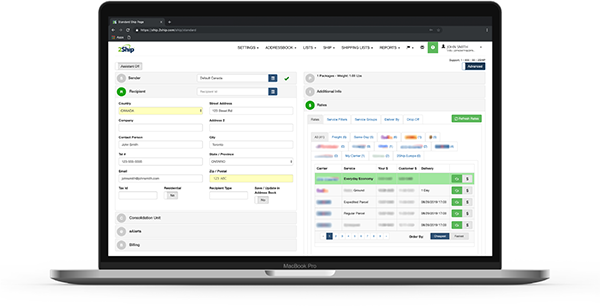
- Access All Carriers: Ship anything from a single document to a full ocean container.
- Total Flexibility: Choose from same-day local couriers, rush delivery, or worldwide freight.
- Live Rate Shopping: Compare rates across our 750+ supported carriers in real-time.
- Branded Experience: Create customized tracking pages and send branded email notifications to your buyers.
- Hardware Freedom: Eliminate the absolute need for physical scales and measuring devices.
- Return Management: Solve all your reverse logistics and return headaches easily.
- Cloud Accessibility: Get 24/7 access to your account across all devices, all you need is an internet connection.
- And more...
About Odoo
Odoo is a highly capable, open-source suite of enterprise business apps that covers everything from CRM and e-commerce to billing, warehouse tracking, manufacturing, and inventory workflows—all managed under a single modular interface. By combining this extensive business management suite with an advanced logistics engine like 2Ship, organizations can seamlessly bridge the gap between their delivery order modules and real-world warehouse execution, ensuring fast, cost-effective, and perfectly synchronized physical fulfillment.