
MS Outlook (Desktop)
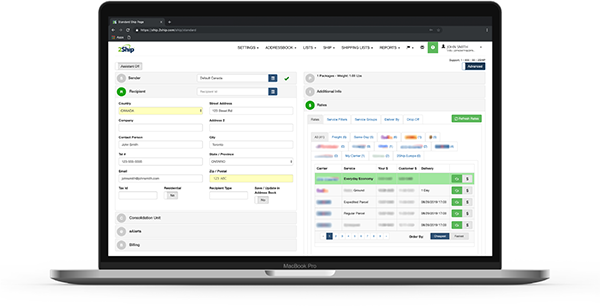
Empower your administration teams. 2Ship integrates with your desktop Outlook address book to instantly populate contact data fields on our shipping screen, letting staff members rate shop and print parcel labels without leaving their email records.
Feature / Data Point
Connection Details
Connection Type
Self connect
Platform Type
Misc / Communications Client
Data Syncing
Populates contact data directly from your address book.
Transform How You Manage Corporate Dispatches
Stop wasting time copying and pasting addresses from emails to your dispatch system. Microsoft Outlook Desktop is the primary business email and communications management client used by corporate offices, administration teams, and enterprise entities globally. The 2Ship self-connect framework gives your office staff the automated tools they need to convert communication records into perfectly executed physical shipments seamlessly.
Key Advantages:
Instant Data Population: 2Ship integrates with your desktop Outlook address book to instantly populate contact data fields on our shipping screen.
Seamless Workflow: Letting staff members rate shop and print parcel labels without leaving their email records.
Eliminate Errors: Pulling directly from your established address book ensures that package destinations are perfectly accurate every time.
Instant Rate Shopping: Quickly run real-time rate comparisons across 750+ local and international carriers to secure the absolute cheapest delivery option for your office parcels.
Total Centralisation: Manage all your transport providers, corporate dispatches, users, and daily mailroom activity from a single, mobile-friendly dashboard.
Create Your 2Ship Account
How it works
Step 1
Contact Maintained in Outlook
Your dispatch cycle begins with your existing client or partner details securely stored within your Microsoft Outlook Desktop application.
Step 2
Instant Address Syncing
2Ship accesses your address book to instantly populate contact data fields right on your shipping screen.
Step 3
Rate Shop and Route
Your administration team instantly compares shipping costs across our vast network of supported parcel couriers to secure the best service, then generates the parcel labels with a single click.
Step 4
Label Printed Seamlessly
Complete your corporate dispatch effortlessly, allowing staff members to execute the entire process without ever needing to manually exit or leave their email records.
Starting at
$14
/month
Everything You Need to Scale Your Shipping
Use 2Ship’s software to unlock enterprise-grade logistics tools specifically designed to handle the unique ebbs and flows of multi-channel global e-commerce.
- Unlimited Users
- Single Location (add more as needed)
- 100 Parcel Labels
- Includes ALL Core Features and Smarts
- Administrator Access and Control
- Visibility and Performance
- Get Spot Quotes (bidding)
- And more...
- Access All Carriers: Ship anything from a single document to a full ocean container.
- Total Flexibility: Choose from same-day local couriers, rush delivery, or worldwide freight.
- Live Rate Shopping: Compare rates across our 750+ supported carriers in real-time.
- Branded Experience: Create customized tracking pages and send branded email notifications to your buyers.
- Hardware Freedom: Eliminate the absolute need for physical scales and measuring devices.
- Return Management: Solve all your reverse logistics and return headaches easily.
- Cloud Accessibility: Get 24/7 access to your account across all devices, all you need is an internet connection.
- And more...
About MS Outlook (Desktop)
Microsoft Outlook Desktop is the primary business email and communications management client used by corporate offices, administration teams, and enterprise entities globally. As an essential hub for daily corporate communication, calendar scheduling, and contact management, Outlook safely stores the critical address details that modern businesses rely on. By integrating directly with advanced dispatch platforms like 2Ship, Outlook transforms from a standard communications tool into a highly efficient launchpad for physical logistics, ensuring office staff can execute outbound shipping tasks flawlessly.