
Locate Inventory
Optimize your stock counts and multi-channel fulfillment lines. Automatically pull open sales lines, run real-time carrier cost comparisons, print shipping waybills, and update your inventory profiles with live tracking data.
Feature / Data Point
Connection Details
Connection Type
Self connect
Platform Type
Inventory
Order Syncing
Pushes orders from Locate Inventory to 2Ship & 2Ship Ecom using scheduled tasks.
Target Audience
Small and medium-sized businesses / Multi-channel merchants
Partner Affiliation
Acquired by Xero (November 2023)
How You Manage Retail Supply Logistics
Manual data transfer slows down your warehouse execution. The 2Ship app seamlessly connects with Locate Inventory, giving small and medium-sized businesses the advanced workflow automation they need to streamline their logistics.
Key Advantages:
Automated Order Extraction: Effortlessly push open sales lines from Locate Inventory directly into 2Ship using scheduled tasks, eliminating manual entry.
Real-Time Rate Comparisons: Instantly run real-time carrier cost comparisons to secure the most competitive pricing for your outbound deliveries.
Streamlined Documentation: Quickly print shipping waybills to keep your order fulfillment lines moving at maximum capacity.
Automated Tracking Returns: Feed tracking status data seamlessly back into the system to automatically update your inventory profiles.
Centralized Control: Manage all your products, multi-channel orders, warehouses, and daily shipping activity from one unified cloud-based platform.
Create Your 2Ship Account
How it works
Step 1
Order Captured in Locate Inventory
Your logistics cycle begins when a multi-channel merchant sale is processed within your advanced cloud-based inventory management system.
Step 2
Scheduled Data Import
2Ship utilizes scheduled tasks to automatically push open sales lines straight into your fulfillment dashboard.
Step 3
Rate Shop and Print
Your dispatch team leverages 2Ship to run real-time carrier cost comparisons, selecting the optimal service and printing your shipping waybills with a single click.
Step 4
Inventory Profiles Updated
Closing the loop, 2Ship feeds the tracking status data directly back to Locate Inventory, instantly updating your inventory profiles and stock counts.
Starting at
$14
/month
Everything You Need to Scale Your Shipping
Use 2Ship’s software to unlock enterprise-grade logistics tools specifically designed to handle the unique ebbs and flows of multi-channel global e-commerce.
- Unlimited Users
- Single Location (add more as needed)
- 100 Parcel Labels
- Includes ALL Core Features and Smarts
- Administrator Access and Control
- Visibility and Performance
- Get Spot Quotes (bidding)
- And more...
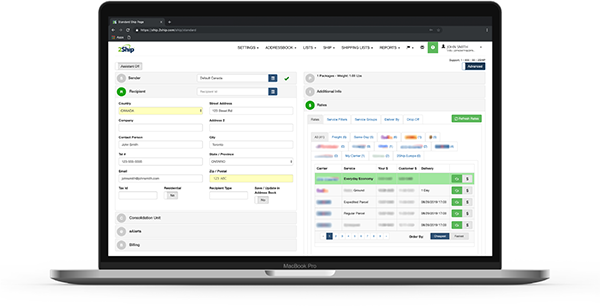
- Access All Carriers: Ship anything from a single document to a full ocean container.
- Total Flexibility: Choose from same-day local couriers, rush delivery, or worldwide freight.
- Live Rate Shopping: Compare rates across our 750+ supported carriers in real-time.
- Branded Experience: Create customized tracking pages and send branded email notifications to your buyers.
- Hardware Freedom: Eliminate the absolute need for physical scales and measuring devices.
- Return Management: Solve all your reverse logistics and return headaches easily.
- Cloud Accessibility: Get 24/7 access to your account across all devices, all you need is an internet connection.
- And more...
About Locate Inventory
Locate Inventory is an advanced cloud-based inventory and order management system meticulously built to optimize stock counts, barcoding, and order fulfillment lines for multi-channel merchants. Designed to offer advanced workflows and automation capabilities for small and medium-sized businesses, the platform integrates flawlessly with major financial tools like QuickBooks and Xero. Acquired by Xero in November 2023, Locate Inventory empowers modern businesses to seamlessly manage their products, orders, and complex warehouses from one highly efficient platform.