
Capitek
Bridge your Capitek workflows with real-world shipping execution. Cross-reference multi-carrier rates, automate custom label layouts, and sync your shipping history effortlessly.
Feature / Data Point
Connection Details
Connection Type
Self-Connect (No developer required)
Platform Type
Marketplace / Supply Chain Visibility
Workflow Sync
Bridges administrative operations with real-world shipping execution.
Label Output
Automates and supports custom label layouts.
Supported Carriers
750+ Global and Regional Carriers
SHIPPING MADE EASY
Stop letting the gap between high-level system monitoring and the physical loading dock slow down your manufacturing processes. The 2Ship app connects perfectly with your Capitek environment, giving corporate distribution teams the automated tools they need to turn administrative visibility into physical logistical action.
Key Advantages:
Real-World Execution: Seamlessly bridge the gap between Capitek’s system monitoring and the actual dispatch of physical goods.
Custom Label Automation: Automatically generate and print shipping labels with custom layouts specifically designed to meet your complex corporate compliance standards.
Cross-Reference Rates: Run real-time rate comparisons across 750+ local and international carriers to find the perfect service for manufacturing and distribution loads.
Synchronised History: Push complete shipping history data straight back into your administrative workflows to ensure your enterprise reporting remains flawless.
Total Centralisation: Manage all your transport providers, warehouse locations, users, and daily shipping activity from a single, mobile-friendly dashboard.
Create Your 2Ship Account
How it works
Step 1
Workflow Managed in Capitek
Your enterprise logistics cycle begins when a product is flagged for distribution within Capitek’s supply chain visibility and monitoring tools.
Step 2
Real-World Bridging
Through the straightforward self-connect setup, 2Ship bridges the workflow, instantly making the logistics data available to your dispatch personnel without any manual re-entry.
Step 3
Cross-Reference and Print
Your logistics team cross-references multi-carrier rates to secure the most cost-effective routing, then prints your highly customised, pre-formatted shipping labels with a single click.
Step 4
History Automatically Synced
Closing the loop, 2Ship automatically syncs the generated tracking numbers and shipping history data straight back into your Capitek enterprise operations.
Starting at
$14
/month
Everything You Need to Scale Your Shipping
Use 2Ship’s software to unlock enterprise-grade logistics tools specifically designed to handle the unique ebbs and flows of manufacturing and corporate distribution.
- Unlimited Users
- Single Location (add more as needed)
- 100 Parcel Labels
- Includes ALL Core Features and Smarts
- Administrator Access and Control
- Visibility and Performance
- Get Spot Quotes (bidding)
- And more...
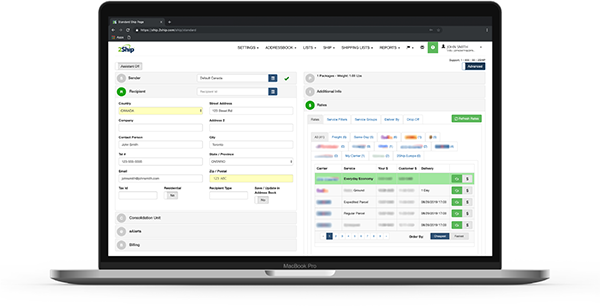
- Access All Carriers: Ship anything from a single document to a full ocean container.
- Total Flexibility: Choose from same-day local couriers, rush delivery, or worldwide freight.
- Live Rate Shopping: Compare rates across our 750+ supported carriers in real-time.
- Branded Experience: Create customized tracking pages and send branded email notifications to your buyers.
- Hardware Freedom: Eliminate the absolute need for physical scales and measuring devices.
- Return Management: Solve all your reverse logistics and return headaches easily.
- Cloud Accessibility: Get 24/7 access to your account across all devices, all you need is an internet connection.
- And more...
About Capitek
Capitek provides advanced software tools explicitly focused on supply chain visibility, system monitoring, and administrative enterprise operations. Built to handle the rigorous demands of modern manufacturing and corporate distribution teams, Capitek empowers businesses to map out complex supply networks, monitor critical systemic events, and maintain tight control over their administrative pipelines. By unifying operations under one intelligent system, Capitek ensures that sprawling corporate supply chains remain agile, visible, and fully optimised.